Auto-Flagging Suspicious Claims — Non-Compliance Detection in Governance & Control
Automatically detect duplicate claims, off-policy spending, and suspicious patterns before reimbursement—with AI capture, configurable workflows, and full audit trails.
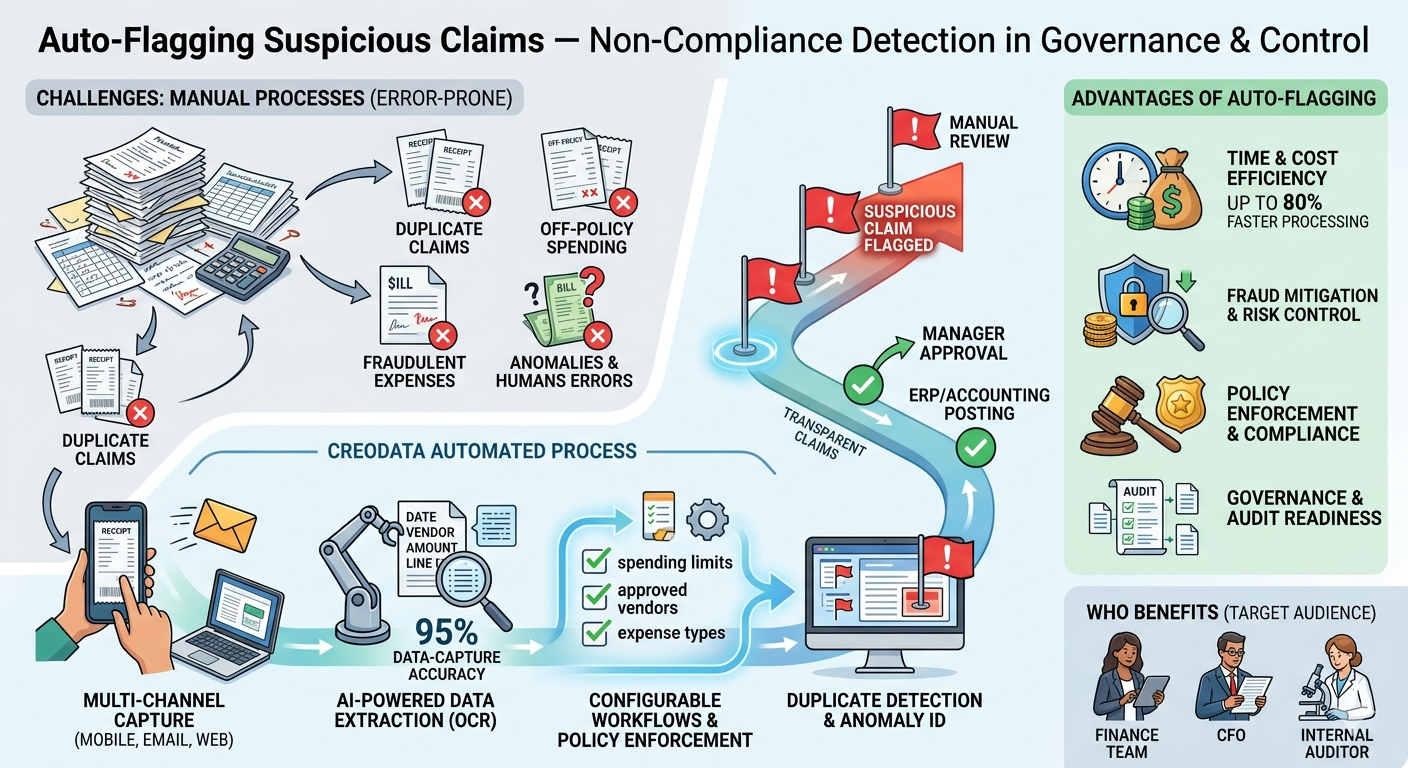
In today's organizations, managing expenses efficiently and securely is more critical than ever. With remote work, frequent travel, and mobile teams, companies face increasing risk: duplicate expense claims, off-policy spending, and fraudulent or erroneous reimbursements can drain resources and impair budgeting and compliance.
This article explores the use case "Auto-Flagging Suspicious Claims" — how an expense-management platform intelligently identifies duplicates, off-policy expenses, and anomalies for finance-team review, with a focus on Creodata Expense Management Automation.
The Challenge: Why Auto-Flagging Is Critical
Traditional expense reimbursement processes typically rely on spreadsheets, paper receipts, or ad-hoc email submissions. These manual workflows suffer from several vulnerabilities:
- Duplicate or repeated claims — An employee might accidentally (or intentionally) submit the same receipt more than once, or submit a corporate-card transaction and also claim a reimbursement separately.
- Off-policy expenses or policy breaches — Employees may submit claims that exceed company limits (e.g., meal allowances), use unapproved vendors, or claim non-eligible expense types.
- Anomalies and fraudulent behavior — Unusually high amounts, suspicious timing, or a pattern of repeated borderline claims could indicate misuse — often invisible in manual reviews.
- Human error and oversight — Manual data entry is error-prone; reviewers might miss duplicates or subtle inconsistencies, leading to overpayment or compliance breach.
- Lack of audit trail and transparency — Without structured, centralized logging, tracing claims back to receipts, approvals, and decisions becomes difficult, complicating audits and undermining governance.
These shortcomings undermine financial discipline, expose organizations to fraud, waste time, and erode trust in reimbursement workflows.
How Auto-Flagging Works
Auto-flagging refers to automatic, system-driven detection of risks: duplicate submissions, off-policy expenses, anomalies, or suspicious patterns.
Intelligent Data Capture & Extraction
- Creodata supports multi-channel submission: employees can submit receipts via mobile app, email forwarding, or web portal.
- AI-powered OCR and document processing (via Azure Document Intelligence) automatically extract key data: vendor name, date, amount, line items, taxes, and totals.
- With 95% data-capture accuracy (per Creodata's published stats), automated extraction reduces manual errors and ensures structured, consistent data across claims.
Because all data is captured in structured form, it becomes feasible to run automated checks for duplication, policy compliance, and anomaly detection.
Configurable Workflows & Policy Enforcement
- Custom approval workflows can be defined based on expense amount, category, department, project, and more.
- The system automatically flags expenses that break policy — missing receipts, spending beyond allowed thresholds, or disallowed categories.
- Flagged claims can be routed for manual review, require additional approval, or be automatically rejected — depending on company policy.
This ensures that policy enforcement happens at submission time — not after reimbursement — preventing non-compliant claims from slipping through.
Duplicate Detection and Anomaly Identification
- The platform detects suspected duplicate submissions — matching on vendor, date, amount, or receipt metadata — helping catch repeated claims or double-dipping.
- Historical data, behavioral patterns, and anomalies across users, departments, or vendors can surface suspicious patterns (e.g., repeated high-value meal claims, frequent borderline submissions, or unusual spikes in certain categories).
- A full audit trail logs who submitted what, when, and how it was processed — enabling transparent review and resolution of suspicious claims.
Creodata's Key Features for Auto-Flagging & Non-Compliance Detection
| Feature | Description |
|---|---|
| AI-Powered Data Extraction | 95% accuracy — automatically captures and structures expense data from receipts, invoices, and forms |
| Multi-Channel Capture | Mobile app, email forwarding, web upload — uniform data capture across all submission methods |
| Configurable Approval Workflows | Custom rules and approval chains based on expense amount, type, department, or project |
| Policy Compliance Checking | Automatically flags or rejects non-compliant expenses before approval |
| Corporate Card Reconciliation | Matches card transactions with receipts to detect misuse or double-submission |
| Reporting & Analytics Dashboards | Real-time visibility into spending patterns, flagged claims, and exception rates |
| Enterprise-Grade Security & Audit Trails | Built on Microsoft Azure, with encryption, identity management, and compliance to SOC 2, ISO 27001, and GDPR |
Advantages of Auto-Flagging Suspicious Claims
1. Time and Cost Efficiency
Automation reduces manual data entry, validation, and review — saving hours of work for finance teams. Creodata reports up to 80% faster processing with their solution. Fewer errors also reduce rework, corrections, and overpayments.
2. Improved Accuracy & Data Integrity
AI-powered OCR ensures consistent, precise extraction from receipts and invoices, reducing human transcription errors. Structured data facilitates reliable checks, duplicate detection, and analytics.
3. Policy Enforcement & Compliance
Company expense policies are enforced automatically — flagged or blocked at submission time rather than during or after approval. Uniform enforcement supports fairness, consistency, and reduces the chance of policy violations slipping through.
4. Fraud Mitigation and Risk Control
Duplicate detection, anomaly detection, and suspicious-pattern identification help catch potential fraud before reimbursement occurs. Audit trails and logs enable full traceability — essential for compliance, internal audits, and transparency.
5. Scalability for Growing Organizations
As the volume of expense claims grows, manual review becomes impractical. Auto-flagging scales with volume without requiring proportional increases in headcount, freeing finance teams for higher-value work.
6. Visibility, Control, and Strategic Insights
Real-time dashboards give finance leaders and management immediate insight into spending behavior, compliance rates, flagged exceptions, and potential risk areas. Patterns of misuse or recurrent policy violations can be spotted, enabling policy adjustments or targeted training.
7. Enhanced Employee Experience
For compliant claims, employees enjoy fast, smooth reimbursement — often with minimal manual input (just snap a receipt). Transparent, predictable workflows reduce frustrations, delays, and back-and-forth clarifications.
8. Strengthened Governance and Audit Readiness
Detailed logging of every action (submission, flagging, approval, posting) ensures full traceability — key for internal and external audits, compliance reviews, and regulatory requirements. Built-in encryption, secure identity management (Azure Active Directory, MFA), and compliance with SOC 2, ISO 27001, and GDPR ensure data integrity and privacy.
Who Benefits — Target Audience
While any organization that reimburses employee expenses can benefit, some stakeholders gain more immediate value:
- Finance & Accounting Teams — Reduced manual workload, fewer errors, predictable workflows, better reconciliation.
- CFOs and Financial Controllers — Greater oversight, real-time visibility, tighter spend control, improved budgeting and forecasting, lower fraud risk.
- Internal Audit & Compliance Officers — Full audit trail, policy enforcement, and traceability of actions — crucial for governance frameworks and regulatory compliance.
- Risk and Fraud Management Teams — Proactive detection of anomalies, duplicate claims, or suspicious patterns.
- Operations and Project Managers — Especially in field operations (construction, logistics, NGOs, government agencies) where consistent policy enforcement across distributed teams is critical.
- IT and System Admins — Cloud-based, secure, scalable solution with minimal infrastructure overhead, deployable via Azure Marketplace.
- Employees & Submitters — Faster reimbursements, simplified receipt submission (mobile app / email), less friction — improving satisfaction and compliance.
In many cases, the transformation goes beyond operational efficiency — it supports a cultural shift toward accountability, transparency, and disciplined spend management.
Conclusion
The use case "Auto-Flagging Suspicious Claims" — under the broader category of Governance & Control and the feature set of Non-Compliance Detection — addresses a key pain point in modern expense management. By automatically identifying duplicate submissions, policy violations, and anomalous or suspicious expense claims, organizations can significantly reduce the risk of fraud, waste, and non-compliance — while streamlining workflows, saving time, and strengthening transparency.
Creodata Expense Management Automation stands out as a mature, enterprise-grade solution for realizing this use case. With AI-powered document capture, configurable workflows, policy enforcement, ERP integration, and audit-ready security, Creodata equips finance teams, compliance officers, and management with the tools needed to govern expense flows robustly — without sacrificing efficiency or employee experience.
For organizations — whether in the private sector, NGOs, public sector, or multinationals — that want to enforce financial discipline, prevent misuse, and maintain transparency, auto-flagging suspicious claims is not just a nice-to-have — it's essential.
For more information, visit Creodata.com.