Transparent Record of Policy Decisions
Capture every claim interaction in an immutable audit trail so policy decisions are fully transparent, verifiable, and ready for compliance review.
Introduction
In today's complex regulatory and business environment, organizations must ensure that every major financial decision is not only correct but verifiable. For claims, reimbursements, or policy exceptions, visibility into the decision-making process builds trust, reduces risk, and strengthens compliance. Audit Trail Integration plays a central role in this by digitally capturing every interaction—from claim submission to final resolution—in a complete, immutable record.
This article explores how such integration supports transparent policy decisions, why it's essential in Governance & Control, how it is implemented in practice, and the advantages and target audiences—drawing on the Creodata Expense Management Automation platform as a real-world example.
The Role of Audit Trails in Modern Governance
An audit trail is a chronological record that traces the detailed sequence of events affecting a specific operation, transaction, or decision. In Governance & Control, it ensures that claims and policy decisions can be reconstructed reliably, showing what happened, who acted, when it happened, and why certain choices were made.
Audit trails serve multiple strategic needs:
- Regulatory compliance: Organizations often need to demonstrate adherence to financial regulations and internal policy standards. Audit logs act as evidence.
- Accountability: When decisions are transparent and recorded, individuals and teams are more likely to act responsibly.
- Dispute resolution: Detailed logs with rationale and commentary help settle disagreements or investigations.
- Operational insights: Complete visibility into decision sequences highlights bottlenecks, recurring policy exceptions, and training opportunities.
In expense management systems like Creodata's, audit trails capture every stage of the claim—submission, validation, policy checks, escalations, approvals, and final posting to accounting systems—creating a full traceability path from start to finish.
What Constitutes a Transparent Audit Trail for Policy Decisions
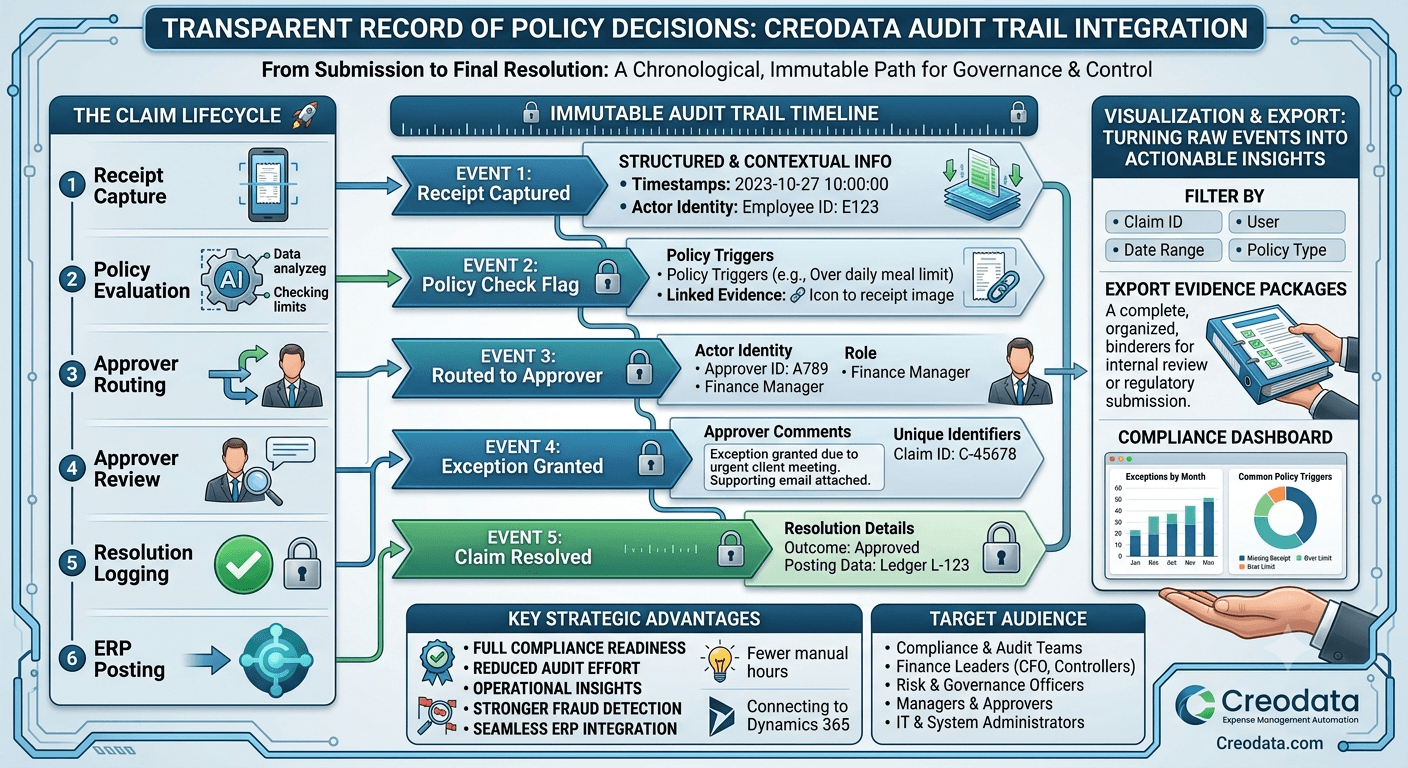
A transparent audit trail goes beyond just basic logging. It records structured and contextual information about every flagged claim:
- Unique identifiers: Each claim or record is tagged with an immutable ID for traceability.
- Timestamps: Every activity—submission, flagging, comments, approvals or rejections—is time-stamped.
- Actor identity: The user or system that performed an action (approver ID, role, delegated authority).
- Approver comments: Textual reasons, policy references, and justifications for decisions.
- Resolution details: Outcome (approved, rejected, escalated), corrective actions, and posting data.
- Policy triggers: Which rule or exception triggered a flag (e.g., over-limit, missing receipt, duplicate claim).
- Attachments and evidence: Linked receipts, communications, and supporting documents.
- Immutable records: Once recorded, events cannot be altered without generating a new event to correct the history.
This rich record becomes indispensable for auditors, compliance teams, and finance leaders who must demonstrate control and context, not just results. It transitions audit trails from a backend technical log to a governance asset.
How Audit Trail Integration Works
Event-Driven Design
Modern systems log every key action as an event:
- Claim received
- Policy check applied
- Flag raised
- Approver viewed and commented
- Approval or rejection
- Posting to finance systems
Each event enters a secure append-only store with relevant metadata. This design ensures that even if data changes later, the historical sequence remains intact for review.
Immutable Storage
Audit trails must be resistant to tampering. Typical approaches use:
- Append-only logs or ledgers
- Secure cloud storage (e.g., encrypted Azure services as in Creodata's solution)
- Role-based access controls so only authorized users can view or export audit logs without altering them
In Creodata's expense platform, audit trails are part of the comprehensive security and compliance framework—designed to support internal governance and external regulatory requirements like SOC 2 and GDPR.
Linkage to Workflows and Data
Audit logs are not siloed; they connect directly to expense workflows. When an expense violates a policy rule, the system automatically flags it. The workflow engine then routes it for appropriate approval. Each step generates an event in the audit log with contextual data such as the policy rule, approver comments, and decision rationale.
Visualization and Export
For real audit needs, logs should be accessible through audit viewers and export tools. These allow auditors or compliance officers to:
- Filter the audit trail by claim ID, user, date range, or policy type
- Export evidence packages (e.g., for internal review or regulatory submission)
- Generate compliance dashboards showing trends and exception patterns
These capabilities turn raw events into actionable insights.
Transparent Audit Trails in Action: Expense Management
In expense management, audit trails underpin transparent policy decisions by capturing every claim's lifecycle. Here's a step-by-step example:
- Receipt capture: An employee submits a receipt via mobile app or email. OCR extracts data (amount, vendor, date).
- Policy evaluation: The system evaluates the claim against set rules (e.g., daily meal limits). If a rule is violated, it's flagged and the reason is logged.
- Approver routing: The workflow engine directs the claim to the appropriate approver based on rules (amount, department).
- Approver review: The approver reviews the flagged claim, adds comments explaining why an exception is granted or denied, and enters a decision.
- Resolution logging: The system logs the resolution, related comments, and timestamps.
- ERP posting: Once approved, systems like Microsoft Dynamics 365 Business Central receive the claim data, and the posting event is logged in both finance and audit systems.
Throughout this process, the audit trail captures both structured data and narrative reasoning—enabling full traceability and accountability.
Key Advantages of Transparent Audit Trail Integration
Integrating rich audit trails into governance processes yields multiple strategic and operational benefits:
1. Full Compliance Readiness
Regulatory frameworks often require organizations to produce records showing their decision pathways. A structured audit trail with full context meets this demand efficiently.
2. Reduced Audit Effort and Cost
Centralized, searchable logs with linked evidence eliminate hours of manual collection and preparation for external auditors.
3. Enhanced Policy Enforcement
Automated flags and audit logs bring clarity to where and why policies are breached—enabling organizations to refine rules and reduce exceptions over time.
4. Better Accountability and Transparency
When comments, timestamps, and decisions are visible and immutable, stakeholders trust the process—from employees to managers and auditors.
5. Operational Insights
Analytics on audit logs reveal patterns—such as frequent policy exceptions or delays at a particular approval level—that can inform training, policy changes, or system adjustments.
6. Stronger Fraud Detection and Prevention
Comprehensive logging makes it easier to spot unusual patterns or recurring suspicious claims early, reducing financial risk.
7. Seamless ERP Integration
With platforms like Creodata's Expense Management Automation, approved expenses automatically integrate into ERP systems like Microsoft Dynamics 365 Business Central, preserving financial integrity and audit trails in both finance and governance systems.
Target Audience for Transparent Audit Trails
Not all users interact with or benefit from audit trails equally. Those who gain the most strategic value include:
Compliance and Audit Teams Internal and external auditors use detailed logs to verify adherence to internal controls and regulatory obligations.
Finance Leaders and Controllers CFOs and finance directors gain visibility into spending patterns, exception frequency, and reconciliation accuracy—all of which improve financial stewardship.
Risk and Governance Officers These stakeholders need evidence of how policies are applied and exceptions are justified—particularly in regulated industries or high-risk environments.
IT and System Administrators Responsible for deploying and maintaining secure systems, they need to ensure that audit logs are properly configured, protected, and available when needed.
Managers and Approvers Audit trails provide context for reviewing policy decisions—helping managers explain and justify exceptions if needed.
Employees and Field Staff While they don't typically review audit logs directly, they benefit indirectly from faster, transparent decisions and consistent enforcement of policy rules, which reduces confusion and error.
Best Practices for Implementing Audit Trail Integration
To maximize the value of audit trails, organizations should follow these established practices:
- Standardize event schemas: Define common fields for event type, timestamp, user, comment, and linked evidence.
- Enforce immutability: Use secure storage with append-only semantics and restricted write access.
- Integrate tightly with workflows: Ensure every decision point in the process emits audit events.
- Enable easy retrieval: Provide filtered views, export tools, and dashboards tailored to auditors' needs.
- Retain logs according to policy: Apply retention schedules that align with regulatory and organizational requirements.
- Train users and stakeholders: Approvers should understand how to add meaningful comments and context for audit purposes.
Conclusion
A transparent record of policy decisions supported by robust audit trail integration is foundational to good governance. By logging every flagged claim with timestamps, approver comments, and resolution details, organizations gain full traceability that drives compliance, accountability, and operational clarity.
Platforms like Creodata's Expense Management Automation demonstrate how modern systems can embed this capability at the heart of expense workflows—leveraging AI data extraction, configurable approvals, and secure logging to deliver both operational efficiency and governance strength.
Whether you're preparing for external audits, tightening internal controls, or optimizing financial decision-making, integrating audit trails into your core governance processes isn't just a best practice—it's a competitive advantage.
For more information, visit Creodata.com